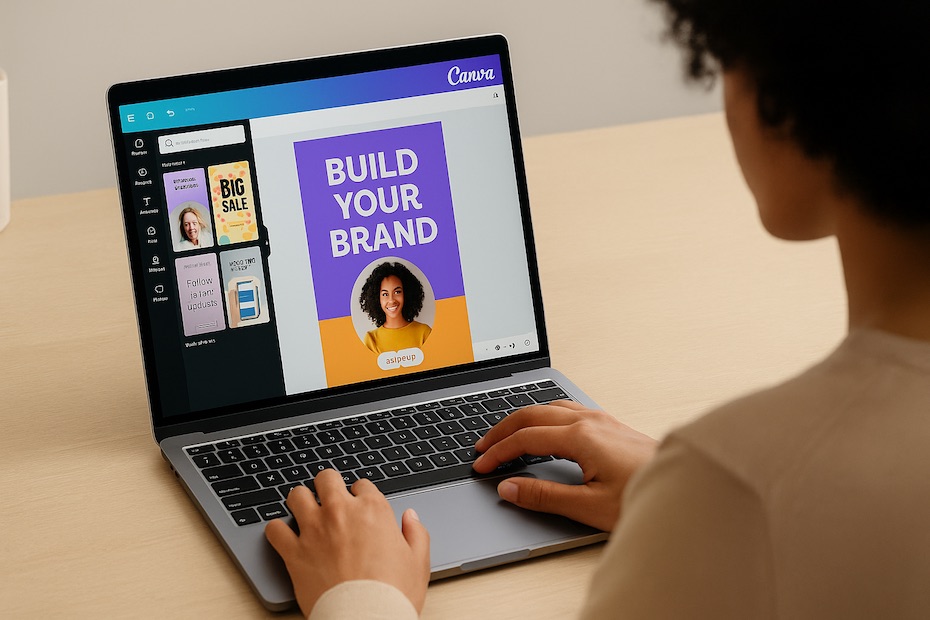
You can use Canva to elevate your marketing efforts by creating high-quality visuals, videos, and branded content at scale—without needing a full design team.
This article gives you an executive-level playbook on how to strategically use Canva for marketing. You’ll learn its most valuable tools, workflow integrations, and performance tracking methods that experienced entrepreneurs use to drive engagement, streamline branding, and accelerate content production.
Understand What Makes Canva a Marketing Powerhouse
Canva isn’t just a design tool—it’s a marketing enabler. The platform combines ease of use with professional-grade templates, collaboration features, and automation tools that make content creation faster and more scalable for businesses.
As an entrepreneur, you know that time and branding consistency are your most valuable assets. Canva allows you to create polished visuals without waiting for external agencies or freelancers. According to Canva’s 2024 internal data, small businesses that adopted Canva Pro reduced design time by 40% and produced five times more content per month.
Beyond templates, Canva’s suite includes tools for video editing, social media scheduling, AI-powered text-to-image generation, and marketing analytics. You can design once and publish across multiple channels—perfect for keeping up with rapid campaign cycles without sacrificing design quality.
Build Brand Consistency with Canva’s Brand Kit
The Brand Kit is the foundation of scalable marketing in Canva. It lets you upload your logos, brand colors, and typefaces, ensuring every piece of content aligns with your visual identity.
When your brand visuals are consistent, recognition improves across all channels—from email newsletters to social media carousels. Research from Lucidpress shows that maintaining brand consistency can increase revenue by up to 33%. With Canva’s Brand Kit, that level of control becomes accessible even to small teams.
You can create templates for common assets like social media graphics, pitch decks, or digital ads. This prevents off-brand visuals when multiple people handle your content. Every time your team designs something new, Canva automatically suggests your brand colors and fonts—streamlining production without creative drift.
Many startups also integrate the Brand Kit with shared folders for specific campaigns. This centralizes creative assets, making it easier to keep your tone and visual identity unified whether you’re running seasonal promotions or announcing a product launch.
Simplify Multi-Channel Campaign Design
You probably manage multiple marketing channels—LinkedIn, Instagram, YouTube, newsletters, and blogs. Canva’s Magic Resize feature is a time-saver that lets you create one design and instantly adapt it to different formats.
Say you build a 1080×1080 post for Instagram. With one click, Canva generates versions optimized for LinkedIn banners, Pinterest pins, and Facebook ads. This eliminates tedious resizing while maintaining design proportion and quality.
It’s one of the reasons digital marketers report up to 60% faster campaign delivery times after adopting Canva’s resizing automation. You can even apply consistent messaging across multiple touchpoints without manual formatting.
In your dashboard, you’ll also find publishing integrations for platforms like Meta, TikTok, and Mailchimp—so you can push visuals directly from Canva into your campaign management tools. This workflow makes Canva a hub for all your outbound creative assets.
Use Canva’s Content Planner and AI Tools for Smarter Execution
Canva now includes AI-powered and automation tools that let you plan, create, and publish seamlessly.
The Content Planner enables you to schedule posts directly to social platforms. You can visualize your marketing calendar, assign designs to dates, and preview how each post will appear before publishing. For entrepreneurs managing multiple projects, this tool eliminates the need for separate scheduling apps.
Additionally, Canva’s Magic Write (AI text generator) helps you draft captions, ad copy, and headlines in seconds. You can generate content ideas or test variations quickly, aligning messaging with visuals. Paired with Magic Edit—which can replace or remove image elements using AI—you gain agency-like agility without technical expertise.
According to a 2024 survey by Statista, 42% of small business owners use Canva’s AI suite to accelerate content production. Leveraging these features means you can stay agile, adapt to trending topics, and maintain a consistent posting schedule that supports audience growth.
Create High-Impact Visual Campaigns That Convert
Effective marketing relies on visuals that drive action. Canva gives you tools to design assets that perform well across various objectives—from brand awareness to conversion.
You can create:
- Social media visuals with interactive animations and calls-to-action
- Email banners that align with seasonal campaigns
- Infographics to communicate complex data simply
- Short videos and Reels using Canva’s in-browser editor
The platform’s video editing tools now include timeline trimming, voiceovers, and transitions—allowing you to produce branded video ads or storytelling clips without leaving your browser.
For example, a 2023 HubSpot report found that short-form video drives 2.5× higher engagement than static posts. By leveraging Canva’s video templates and brand overlays, you can produce video campaigns that look professional even with minimal production budgets.
You can also monitor asset performance if you integrate Canva with your analytics tools. Tracking engagement rates and click-throughs helps refine visual strategy, ensuring every post delivers measurable ROI.
Collaborate Efficiently with Teams and Freelancers
Even if you lead a small operation, collaboration is key. Canva’s team workspace supports shared folders, permission levels, and real-time co-editing.
If you’re working with freelancers or marketing assistants, you can assign roles: designers, editors, or viewers. This ensures content passes through necessary review stages without losing version control. Canva also logs activity history, so you can track who made changes—useful for accountability and brand compliance.
For larger teams, Canva for Teams includes built-in commenting, approval workflows, and version management. You can also connect it with productivity tools like Slack or Trello, keeping creative and project management aligned.
This eliminates messy email threads or disorganized file sharing, enabling faster delivery of campaigns. Many entrepreneurs report that this collaboration setup cut content turnaround times by 50% in their first 90 days of adoption.
Analyze, Scale, and Evolve Your Marketing Impact
Once Canva becomes part of your marketing ecosystem, you’ll want to measure its true impact. The key is tracking metrics that reflect both efficiency and engagement.
Measure:
- Time saved on design creation compared to outsourcing
- Content output per week or campaign
- Engagement growth across social platforms
- Revenue uplift from campaigns designed in Canva
Canva’s analytics and integrations with Google Analytics, Meta, and HubSpot allow you to track these KPIs. As your marketing efforts scale, use these insights to refine creative direction, update templates, and introduce new content types (like eBooks or video tutorials).
You can also benchmark design productivity by tracking how quickly you go from concept to publication. When you identify bottlenecks—like approval delays or inconsistent messaging—you can adjust team workflows to stay agile.
By continuously optimizing these processes, Canva evolves from a design tool into a full-fledged marketing operations platform for your business.
Key Ways Entrepreneurs Use Canva for Marketing
- Create consistent branded visuals using the Brand Kit
- Automate resizing for multiple platforms
- Schedule posts with Content Planner
- Design video ads and social graphics fast
- Collaborate with team members in real time
Take Control of Your Marketing Design Today
With Canva, you turn creative vision into execution without waiting on agencies or technical designers. You gain full control of your brand presentation, streamline workflows, and deliver content that connects. The more you integrate it into your daily marketing process, the faster you’ll see measurable growth in visibility and audience trust.

Olivier Gillier is a global investment strategist and co-founder of RioBlanco Capital LLC, with over 20 years of experience in wealth management and international markets. A former Senior Vice President at Merrill Lynch, he now focuses on private equity, cross-border finance, and philanthropic initiatives worldwide.